


Manufacturers selling custom products often struggle with effective product lifecycle management, as a single product line can yield dozens of variants. Spreadsheets multiply, errors increase, and teams spend more time confirming data instead of building products.
This is when the configurable BOM becomes a game-changer. Unifying all possible product variants into a single structure, it can eliminate the chaos of managing countless documents. Moreover, when paired with product customization, it enables manufacturers to deliver a more immersive shopping experience, where shoppers can freely design products on their own while receiving accurate BOMs without support from production and sales teams.
This blog will showcase how to level up BOM processing with product configuration and provide a comprehensive guide to a successful implementation. Keep scrolling to discover!
What Is A Configurable BOM?
A configurable BOM, also known as a cBOM or dynamic BOM, is a production planning tool that enables manufacturers to create and manage BOMs that can be customized to meet specific demands. You can use it across a broad range of settings, including the production of configurable products such as furniture, automotive parts, and industrial components.
Traditional BOMs vs. Configurable BOMs
A bill of materials (BOM) is traditionally fixed, listing exactly the components and quantities required to build a product version. This works well when a manufacturer focuses nearly entirely on a single item. However, as the modern market rises in expectations for product customization, personalization, and configuration, using static BOMs quickly breaks down.
By contrast, configurable BOMs contain all possible product BOMs in a single structure, with configuration rules that determine which parts apply based on a customer’s selection. Thus, when they choose a size, color, or any other feature, a precise BOM is ready for production.
Additionally, using these BOMs is highly evaluated for minimizing redundant data entry and documentation overhead, preventing incompatible component combinations, supporting seamless variant management across the product lifecycle, and enabling faster quoting.
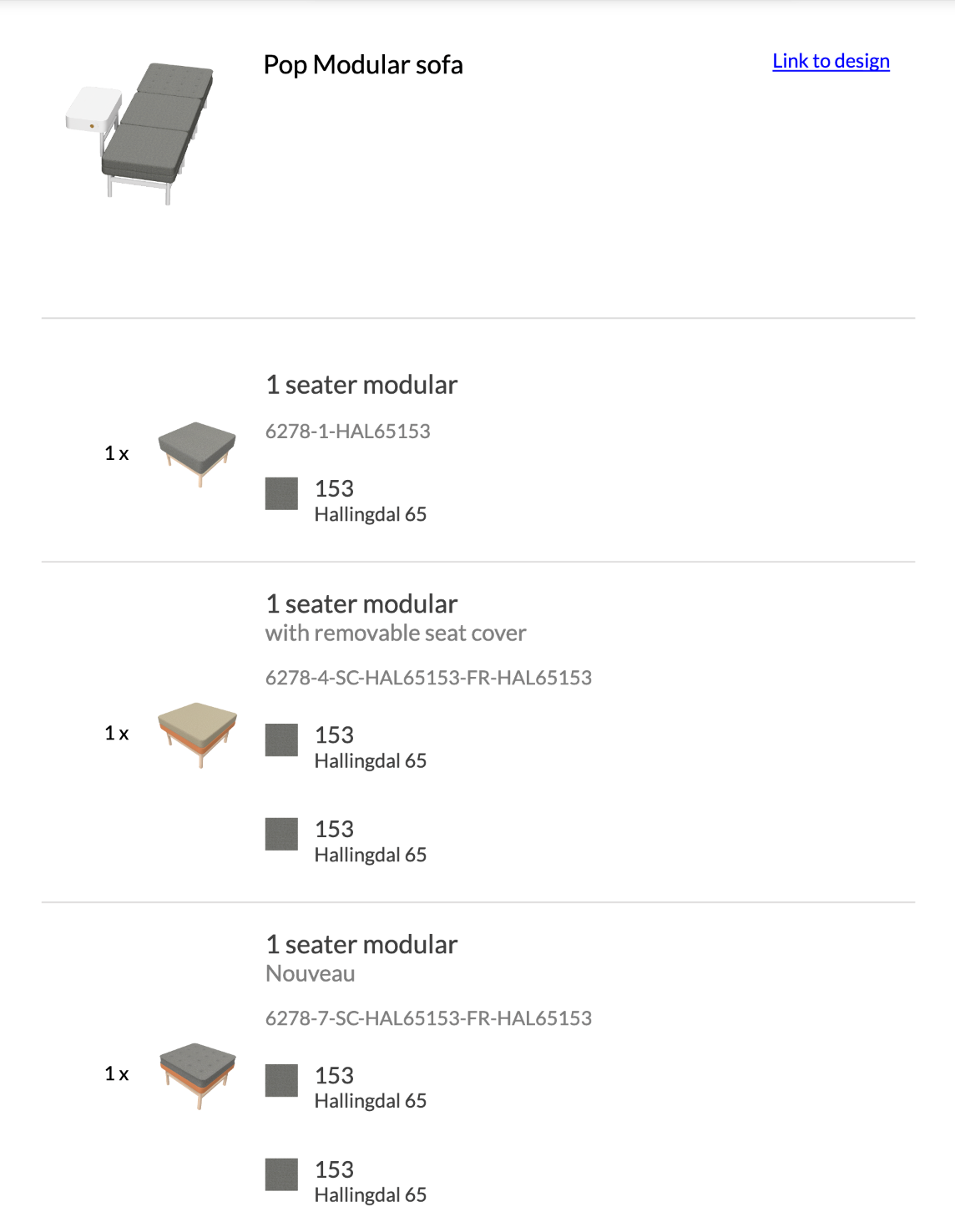
Understanding BOM Processing In Manufacturing
BOM processing is the end-to-end journey of BOM, from the stage at which a buyer places a configured order, through validation, to the production floor, and ultimately to fullfillment.
Let’s take a closer look at the following parts in this section to have a deeper understanding:
How BOM Data Flows from Sales to Production
Standard production workflows start with a sales order and trigger the built-in engine to release a BOM with the correct component list. This list is then passed to production planning, where materials are allocated, work orders are created, and scheduling begins. The final result is that BOM informs purchasing, inventory management, and the shop floor.
When this flow is seamless, manufacturing workflows accelerate, and order accuracy improves significantly. Otherwise, when it breaks, mistakes and disconnected systems are non-negotiable. That’s why BOM management is not only an administrative task; it should also be a crucial part of enhancing manufacturing efficiency. In fact, “manufacturing rework and scrapping can account for 5-30% of total production costs”, says Reliabilities Solutions.
Challenges of Manual BOM Creation
Manual BOM hand-offs are plagued by a variety of well-documented problems, such as:
- Exponential complexity: Each new product variant requires adjustments, making it difficult to track dependencies and ensure high accuracy across a growing catalog.
- High error risk: Updating product feature selections in spreadsheets or disconnected systems potentially leads to missing parts, incorrect quantities, and assembly errors.
- Inefficiency: Engineering and operations teams spend significant time and effort manually adjusting BOMs, rather than focusing on high-value customer experience.
- Lack of integration: Without ERP integration, manufacturers must constantly re-enter and verify data and configurations across systems for each selection, which compounds the risk of errors and delays in buyers' wait times when placing an order.
How Product Configuration Software Improves BOM Accuracy
Configuration rules for accurate automation
Product configurators are interactive platforms that allow users to freely customize products and visualize them without making mistakes. Buyers can select features, dimensions, finishes, materials, and more, and the system instantly validates them against the rules set.
Some advanced tools like VividWorks product configuration software, include ready-made logic to handle complex building rules for modular products effectively. Engineering rules and constraits are enforced once customers configure, ensuring only feasible combinations generate an accurate BOM. In other words, invalid selections are prevented before they ever reach production—it is also the foundation of automated BOM generation: when a valid configuration is finalized, an accurate, production-ready BOM is produced automatically.
Eliminating manual errors
There is a clear fact that human errors in BOM processing typically arise at handoff points:
- A salesperson writes down what the customer wants
- An engineer reads that note and inputs a list of parts
- A planner takes that list and manually types it into the ERP system
In this way, every time you have to retype and translate information, there is a chance for a typo or a misunderstanding. By implementing a robust product configuration software with a built-in BOM feature, buyers and sales teams can customize products in real time and generate accurate BOMs based on selected options, minimizing human transcription errors.
Boosting manufacturing accuracy
Another striking benefit of a dedicated BOM is that it happens right on the shop floor, where your products are built. When workers get a confusing BOM, everything grinds to a halt. Your team has to stop working, find an engineer, and clarify what the order actually means.
To solve this, many manufacturers that sell complex, bespoke items use modular product configurators integrated directly into their CRM, ERP, and production systems. This enables accurate BOM generation, ensuring consistent BOM data across all business departments. As a result, you increase your downstream manufacturing accuracy without costly mistakes.
How a BOM Configurator Works
Here is a short summary of the way a BOM configurator is used and works in your workflow:
- 3D product configuration: Users interact with 3D configuration and visualizations, selecting product features and deeply evaluating the product design from all angles.
- Real-time validation: The built-in system validates choices against predefined rules, ensuring no incompatible combinations or missing parts before their production.
- Dynamic BOM generation: When a valid configuration is confirmed, the configurator compiles a BOM, using all rules and dependencies without any manual input.
- System integration: Manufacturing BOMs seamlessly connect with ERP, CAD, PLM, CRM, and eCommerce platforms, ensuring BOM data accuracy and consistency.
- Automated output: The system generates technical documentation, pricing details, cut sheets, and assembly instructions, which are essential for confirming final orders.
Learn more: What is ERP Product Configurator and Why It Matters
Conclusion
Mastering BOM processing with product configuration is not only an operational improvement but also a strategy that enables manufacturers to scale product customization. Ultimately, by replacing static processes with a configurable BOM driven by strong configuration rules and automated generation, businesses can step by step achieve the higher precision and speed that modern configure-to-order manufacturing demands.
Book a demo with VividWorks today to see how our 3D configurators transform this trend!
FAQs
- How does the product configurator improve BOM processing?
Product configuration software transforms BOM processing by replacing manual interpretation with automated, rule-driven generation. When a feature is selected, the system uses predefined logics to validate and then automatically generates a complete, manufacturing-ready BOM.
- What is the difference between an engineering BOM and a manufacturing BOM?
An engineering BOM (eBOM) defines a product’s design, components, and specifications. A manufacturing BOM (mBOM) organizes those components according to how the product is built on the production floor, supporting procurement, work orders, and production planning.
- Can a BOM configurator integrate with ERP systems?
Yes. An ERP integration is one of the most critical capabilities of a modern BOM configurator. Without it, teams must manually re-enter BOM data into the ERP, increasing the risk of errors and delays. Leading configurators support CRM, CAD, PLM, and eCommerce integration.
Table of Content
-3.avif)
Streamline your process today!


.png)

