


Getting a buyer to your product page is only half the job. Once they visit there, the page has to do the convincing, such as answering their questions and making the next step obvious. Otherwise, all that traffic just bounces to a competitor; of course, you can’t close any deals.
That’s also when you need to learn how to increase conversion rate for product pages of ecommerce sites to reduce friction, build trust, and communicate what makes the product worth buying. For products that are hard to judge from flat photos alone, such as furniture, modular items, and anything customizable, interactive technologies have become one of the most effective ways to achieve the best results. Now, keep scrolling to discover more!
What Is an Ecommerce Product Page Conversion Rate?
A product detail page (PDP) is the page where a shopper views a specific element, such as its images, price, description, and purchase options. Product page conversion rate measures how effectively that page turns visitors into buyers: Purchases ÷ Product Page Visitors × 100.
Not every valuable action on a PDP is a completed purchase. Micro-conversions, such as adding to cart, configuring a product, requesting a quote, or starting checkout, are often just as important to track, especially for higher-consideration or made-to-order products, where the buying journey takes longer. Which action matters most depends on the business: a fast-moving fashion retailer will care most about add-to-cart and checkout rates, while a manufacturer selling configurable product designs might care more about quote requests.
Why Product Page Optimization Matters
A well-optimized page reduces customer uncertainty about purchasing. It communicates product value clearly, builds trust through social proof and transparency, and removes friction caused by confusing layouts, missing information, or even poor mobile experiences.
Many of these usability problems are not unique to a particular eCommerce business or industry. A recent Baymard’s research, based on more than 130,00 hours of testing, found that 73% of usability issues are shared between desktop and mobile sites, while at least 74% of similar issues and user behavior patterns are shared across niches selling physical items.
That’s why many marketers admit that one of the most practical ways to increase conversion rate for product pages of eCommerce sites is to eliminate these fundamental usability barriers before investing in more advanced CRO tactics or online sales tools for their brands.
How to Increase Conversion Rate for Product Pages of Ecommerce Sites
1. Make the Product Value Clear Above the Fold
Within a few seconds, a shopper should understand what the product is, its main benefit, the price, what makes it different from alternatives, and what to do next. Your product page should communicate benefits before specifications, helping buyers quickly understand how the product solves their needs rather than making them interpret a list of technical details.
2. Use High-Quality Product Images
Product images play a major role in helping shoppers evaluate products online. That’s why sellers need to show multiple angles, close-ups of materials and details, lifestyle shots that put the product in context, and images that communicate the product’s real-world scale.
3. Add 3D, AR, and Interactive Product Visualization
For products where static images genuinely fall short, such as furniture and any complex designs, 3D product visualization can take the experience further. With 360° product views, shoppers can effortlessly rotate, zoom, and inspect items from all angles, offering a deeper understanding and creating a more interactive experience that is difficult to find with photos.
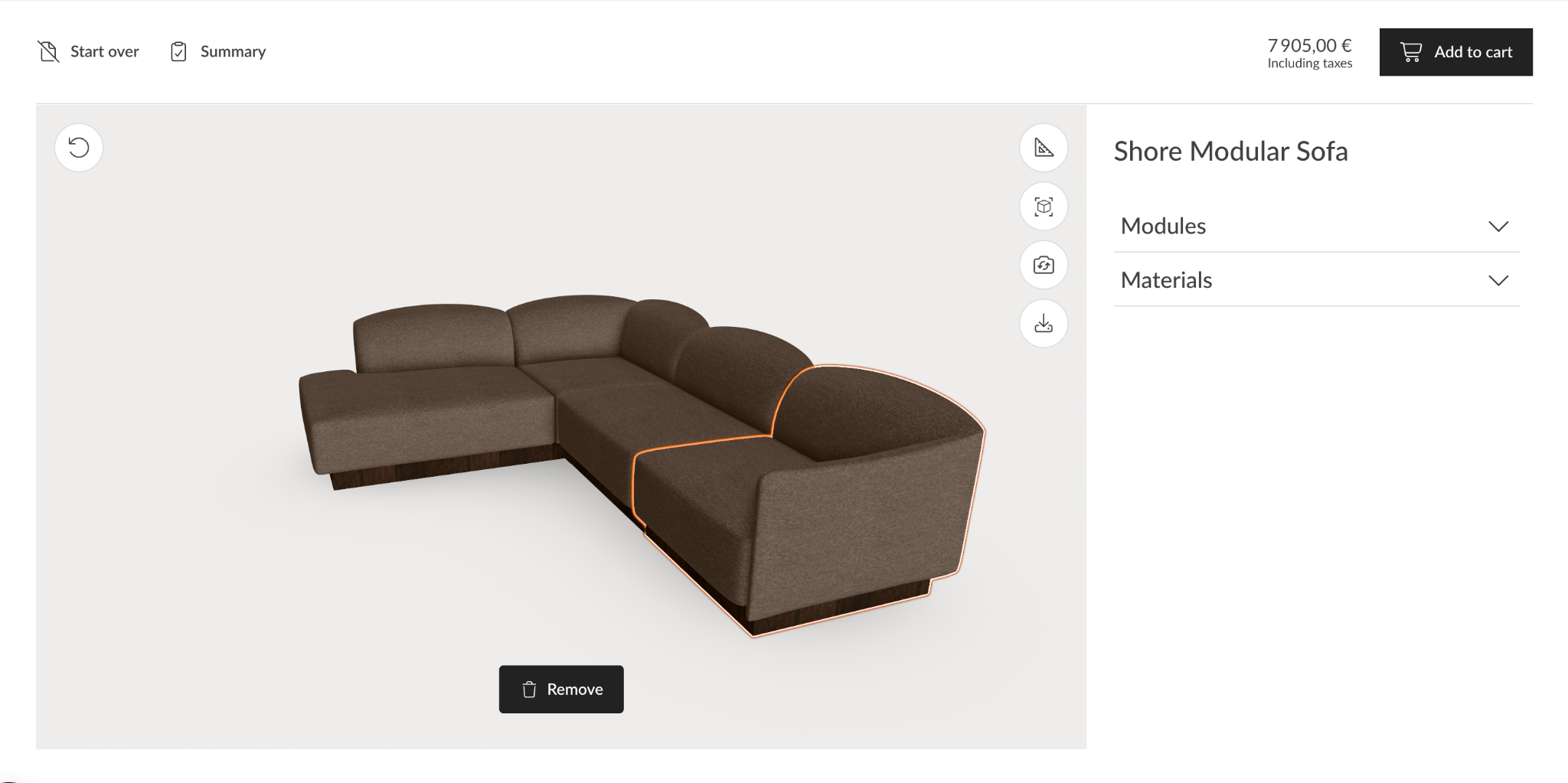
Augmented reality (AR) can take this a step further by enabling the ability to place selected products in your own space. This helps visualize how an item will look and fit within the room, making it easier to assess its size, style, and compatibility with their existing space.
4. Write Product Information That Answers Buying Questions
Good product copy anticipates the questions and objections shoppers have before they buy. You should focus on explaining the benefits, dimensions, materials, compatibility, what's included in the box, care instructions, delivery details, and warranty terms. Besides that, don’t forget to make this essential information easy to scan with bullet points, short paragraphs, descriptive headings, and expandable sections rather than dense blocks of text.
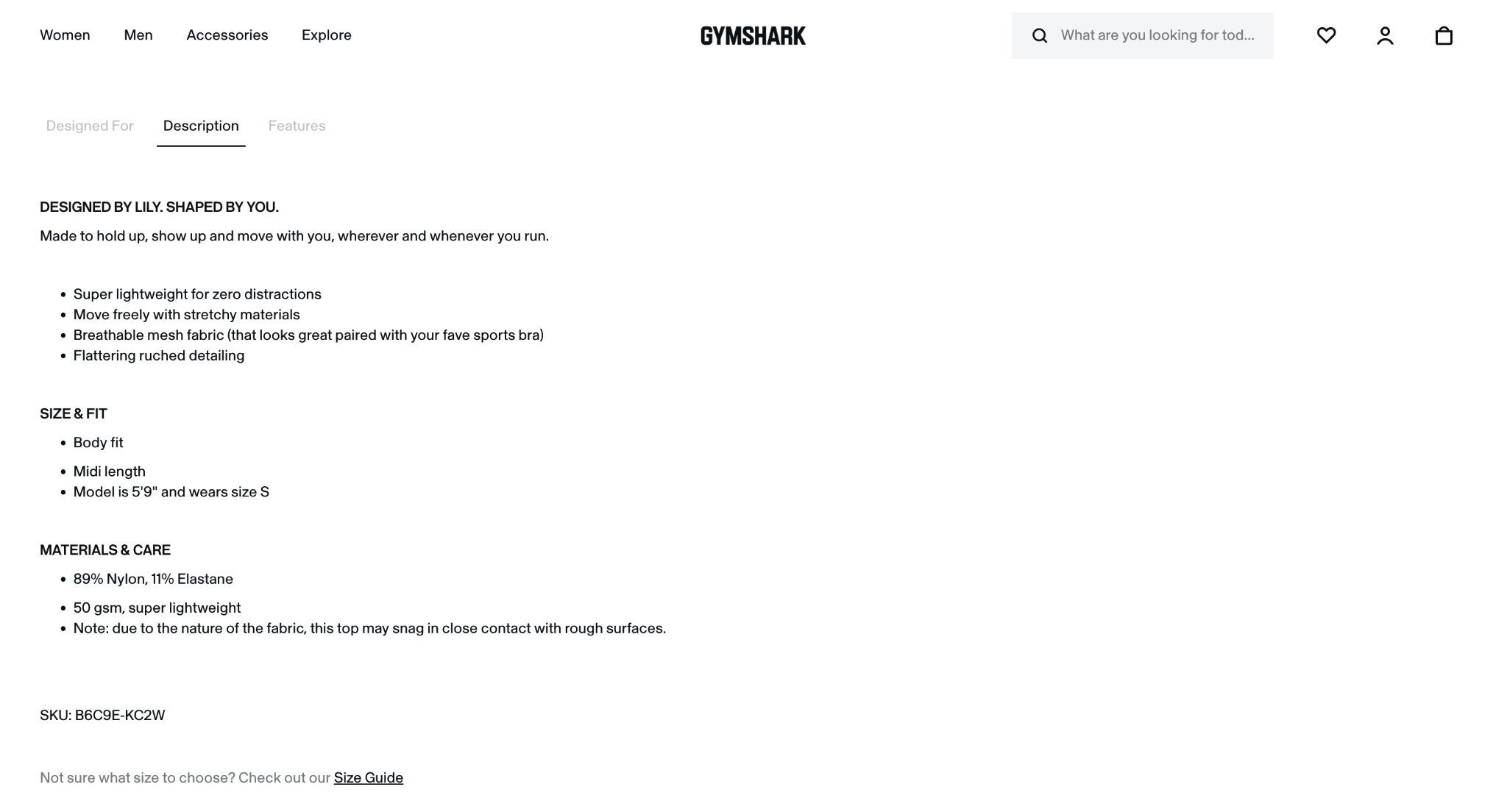
5. Simplify Product Customization and Variants
The more customizable a product is, the more important it is to make the selection process simple. This is where online product configurators can make a difference, allowing shoppers to select options and visualize their choices in3D as they build their product. Instead of navigating through complex menus or relying on static images, customers can see how different configurations affect the final product and make decisions with greater confidence.
6. Use Clear and Prominent CTAs
Call-to-Action (CTA) clarity is one of the fastest ways to increase conversion rate for product pages, since even a well-convinced shopper won't buy if the next step isn't obvious. "Add to Cart" and "Buy Now" should be impossible to miss. However, for complex or custom products, a "Request a Quote" CTA is often more appropriate than a direct purchase button.
On mobile, a sticky CTA that stays visible while scrolling meaningfully reduces drop-off. If a product has variants, such as size, color, finishes, configuration, require that selection to be made clearly before the CTA activates, so there's no ambiguity about what's being ordered.
7. Build Trust With Reviews and User-Generated Content
To increase conversion rates for product pages of eCommerce sites, you need to give customers enough social proof to feel confident about their purchase. Star ratings, written reviews, photos and videos, verified purchase badges, Q&A, and testimonials are the most common ways to show that real shoppers have purchased, used, and valued your products.
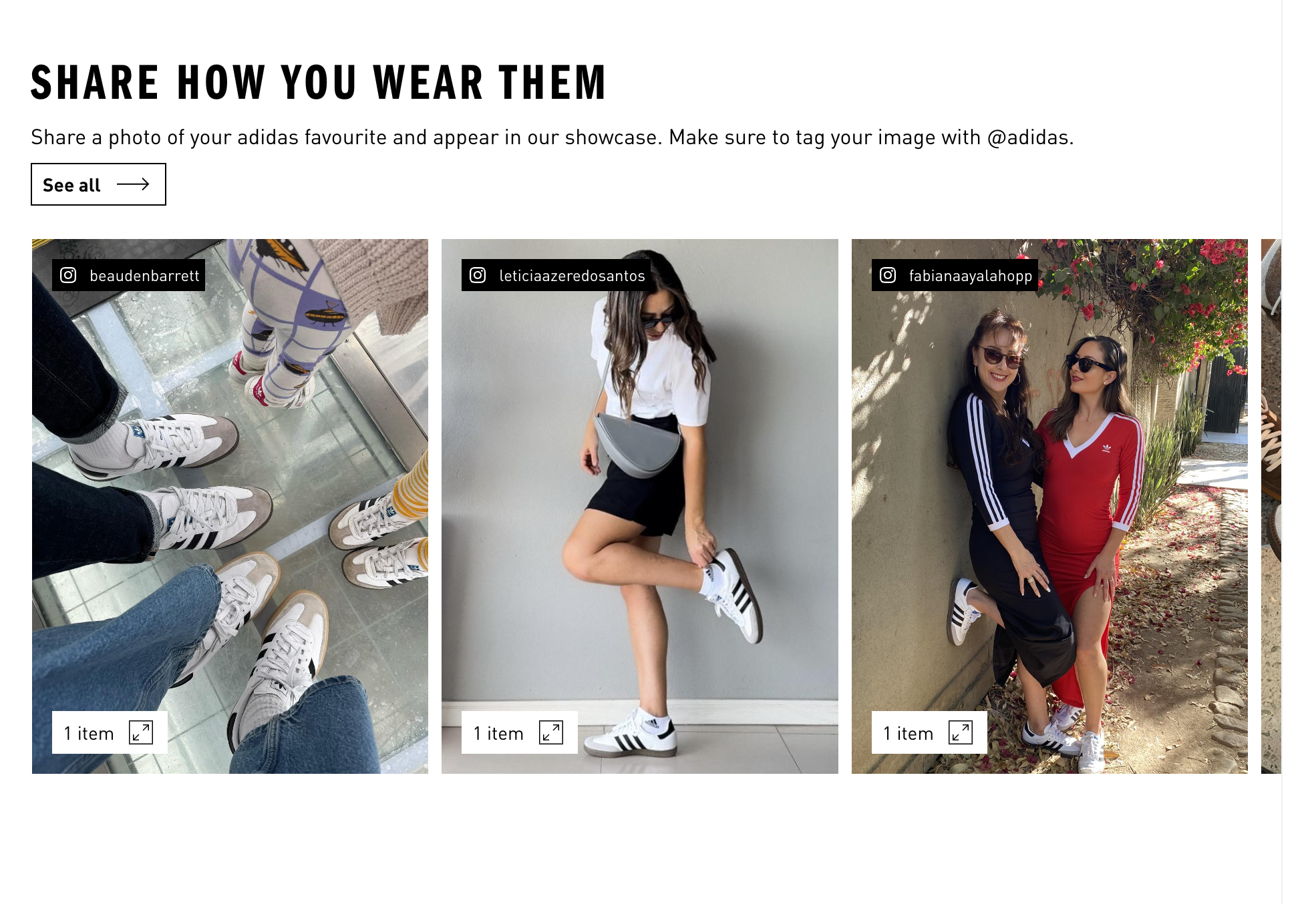
8. Make Pricing, Shipping, and Returns Transparent
Shoppers shouldn't have to hunt for the price, available discounts, shipping costs, estimated delivery window, return policy, current availability, or warranty terms. Unexpected costs discovered late in checkout are one of the most common reasons for cart abandonment.
When you are selling customizable products, real-time pricing matters even more. Customers need to understand how their choices, such as size, materials, finishes, or additional features, affect the final price before they commit to a purchase. If pricing only becomes clear after submitting a request or speaking with a sales rep, it can create friction. This is where many businesses consider using Visual Configure, Price, Quote (Visual CPQ) to allow clients to configure products and see how their selections affect the price instantly.
9. Optimize Product Pages for Mobile and Speed
The next tip to increase conversion rates for product pages of eCommerce sites is to ensure they perform well on mobile. Mobile commerce is projected to account for over 60% of all eCommerce sales in 2026, highlighting the significance of a mobile-first shopping journey. Thus, you need to make sure images are compressed without sacrificing quality, buttons and options are easy to tap, and key information is visible without excessive scrolling. Also, you should minimize unnecessary scripts and apps that potentially slow down page loading.
Ultimately, a fast, responsive product page reduces friction and makes it easier to browse, evaluate, and purchase products on any device, including desktop, phones, and tablets.
10. Test and Optimize Product Pages Continuously
There is no single product page template that works for every audience or product. It’s great to use A/B testing to compare different elements and see what drives better performance. For example, you can test CTA placement, product image order, review placement, description length, sticky CTAs, 3D versus static images, and the visibility of shipping info. Also, track relevant metrics to measure the impact of each change and optimize properly.
How to Measure Product Page Conversion Rate
Besides tactics to increase conversion rates for product pages of eCommerce sites, you first need to understand which metrics show how well your pages perform. The following metrics help identify where shoppers drop off and where there is room for improvement.
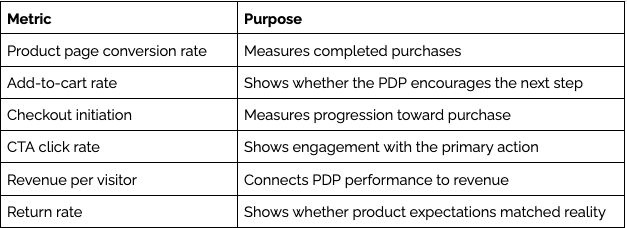
Performance can vary by product type, niche, industry, and price point. You should break down your data by traffic source, device, product category, price range, and customer segment to identify which audiences or pages have the greatest chances for optimization.
Tools and Technologies for High-Converting Ecommerce Product Pages
The right mix of tools can help increase conversion rates for product pages of eCommerce sites without requiring a full site rebuild. Let’s see how these technologies work together:
- Product configurators
Top-rated providers like VividWorks empower businesses to create more interactive experiences with 3D configurators. Customers can customize products, explore different configurations from multiple angles, and see pricing updates in real time. This level of clarity helps reduce uncertainty and gives shoppers greater confidence in their choices. Also, built-in product logic supports complex configuration rules, enabling the ability to offer highly customizable items while ensuring compatibility and coherence in the final designs.
For simpler customization needs, 2D product customizers can be a more straightforward and cost-effective option. Customers can select options such as colors, sizes, and materials.
- Image optimization
Tools such as TinyPNG can compress product images while maintaining visual quality, helping brands reduce page load times and improve the mobile shopping experience.
- Ecommerce platforms
Major ecommerce platforms such as Shopify or WooCommerce provide the foundation for building and optimizing product pages. Their app ecosystems also make it easier to add features such as reviews, product customization, analytics, and other conversion tools.
- Analytics and testing
GA4, Microsoft Clarity, Hotjar, and dedicated A/B testing platforms help you understand how shoppers interact with product pages. You should use these insights to identify friction points, test changes, and make data-driven optimization decisions for your product pages.
Conclusion
There is no all-in-one strategy to help increase conversion rates for product pages of eCommerce sites. Depending on your products, niche, industry, target audience, and customer journey, some optimization tactics may have a greater impact than others.
Ultimately, the goal is simple: make it easier for shoppers to clarify your products, trust your brand, and feel confident enough to buy. That’s why you should continuously analyze buyer behavior, identify frictions, and test improvements to find what works best for your store.
Table of Content
-3.avif)
Streamline your process today!




.png)
