
Product catalogs used to be static: PDFs or printed booklets that listed items, prices, and little else. Today, buyers expect more. An interactive digital catalog turns that flat page into a living experience, where shoppers can click, filter, watch, and explore instead of just scrolling. For businesses with complex, highly configurable products, this shift isn't cosmetic. It changes how you find products, understand them, and move toward a purchase, making it a practical upgrade over the old digital catalog for any growing ecommerce catalog.
Keep scrolling to find the comprehensive answer to “What is an interactive digital catalog?”
What Is an Interactive Digital Catalog?
An interactive product catalog is a web-based publication that lets users explore products and information via dynamic, immersive features rather than simply viewing static pages. The key distinction is that users can take action within the catalog. They can effortlessly visit a product page or contact a sales team without relying entirely on a separate sales process.
These days, interactive digital catalogs can come in a broad range of formats, such as:
- A digital flipbook that recreates the experience of turning catalog pages
- A searchable online product catalog
- A web-based product gallery with rich media and shopping functionality
Key Features of an Interactive Digital Catalog
A well-structured interactive catalog should reflect the products, audience, and goals of the business. Here are 8 common elements that help transform a more compelling experience.
1. Clickable product links and hotspots
Customers can tap directly on a product within an image or layout for additional information. For eCommerce brands, these links can lead to product pages or shopping carts. Otherwise, B2B companies utilize them to navigate technical documentation and downloadable files.
2. Search, filtering, and navigation
Large catalogs live or die on findability. Filters by category, size, material, or price let buyers narrow hundreds of SKUs down to a handful in seconds, supporting real product discovery.
3. Embedded videos and rich media
Short demo clips, 360° spins, or lifestyle footage give context that a still photo can't, especially for products with moving parts or configurable finishes. For example, a furniture brand might embed a video showing a product in a room, while an industrial manufacturer could demonstrate how a component works—helping you explore items more immersively.
4. Product specifications and additional information
Dimensions, materials, compatibility, and compliance data should sit right next to the product, so customers don't need to leave the page or file a support ticket to get answers. However, depending on the industry, you can display some of the following information:
- Dimensions and materials
- Product specifications and technical documentation
- Available finishes or colors
- Pricing and availability
- Downloadable brochures or CAD files
- Related products and accessories
5. Shoppable links or direct purchasing
A shoppable catalog connects product discovery with the next step in the buying journey.
Customers can click a product, open its product page, or access a purchase link. This is particularly useful for businesses with straightforward products and established online stores. In B2B, the equivalent action might be requesting a quote or contacting a distributor.
6. Forms and quote requests
This feature of interactive catalogs works well for industrial components, commercial furniture, and custom solutions that may require specific configurations, quantities, or project details before a purchase can be made. In this way, it’s essential to include forms that let potential visitors request a quote, ask product questions, or contact a sales representative.
7. Interactive images and galleries
Interactive digital catalogs can use image galleries to give visitors a closer look at products from different perspectives. A furniture catalog, for instance, might display several product angles, finish options, or room settings. Additional features such as zooming and image navigation make it easier to explore product details that may not be visible in a single photo.
For products with multiple variations, utilizing 3D online visualization can provide a more immersive way to explore configurations, finishes, and layouts. This helps better understand how a product design can be customized before making a purchase or requesting a quote.
Learn more: Top 5 Furniture Brands Using Product Visualization
8. Analytics and engagement tracking
Digital catalogs can track page views, product clicks, engagement, or other interactions, helping determine which products attract attention and where users move next. Then, analytics can support decisions about content updates, product presentation, and sales follow-up. But the available metrics depend on the catalog platform and its integrations.
Interactive Digital Catalog vs. Traditional Product Catalog
The main difference is how your customers access and explore product information.
A printed catalog relies on pages, images, and written descriptions. A static PDF can add hyperlinks, but its experience may still be largely document-based. An interactive product catalog can provide searchable content, clickable product links, videos, galleries, and other features. It can also connect to product pages, quote forms, or product configuration tools.
Traditional product catalog
Interactive digital catalog
- Printed pages/ static PDF
- Primarily text and images
- Manual browsing
- Separate sales or eCommerce steps
- Web-based digital experience
- Text, images, videos, and interactive elements
- Search, filters, and navigation
- Links to product pages, checkout, or quote requests
Real-world Examples of Digital Catalogs Across Industries
1. Furniture catalog
mmcité’s Cuby is a strong digital catalog example of how a furniture brand can combine product discovery with interactive features. The page features detailed imagery, videos, materials, specifications, and downloadable resources, helping visitors explore the product from multiple angles. They can also request a quote, creating a clear path from visualization to the next stage of the buying process without navigating to another page.
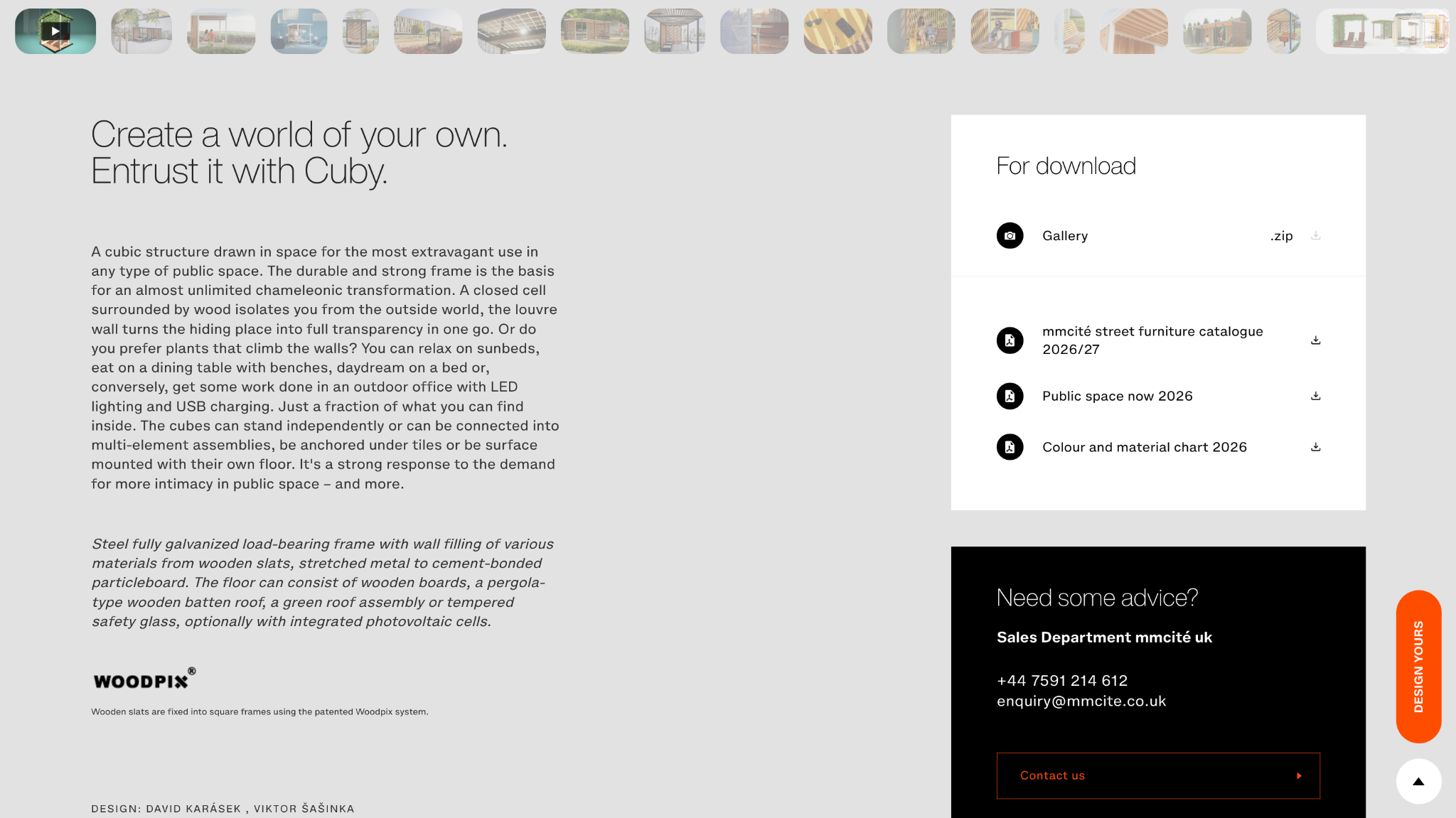
A “Design yours” widget on the right side links directly to an online 3D product configurator, where visitors can customize the design on their own by selecting different frame types, furniture, walls, and more. Moreover, real-time pricing updates help reduce their hesitation when shopping online, significantly improving conversion rates and sales. This 3D design tool is supported by VividWorks, which has more than 20 years of experience in 3D configuration and visualization across key markets, such as the US, UK, EU, Japan, and more.
2. Industrial/ B2B catalog
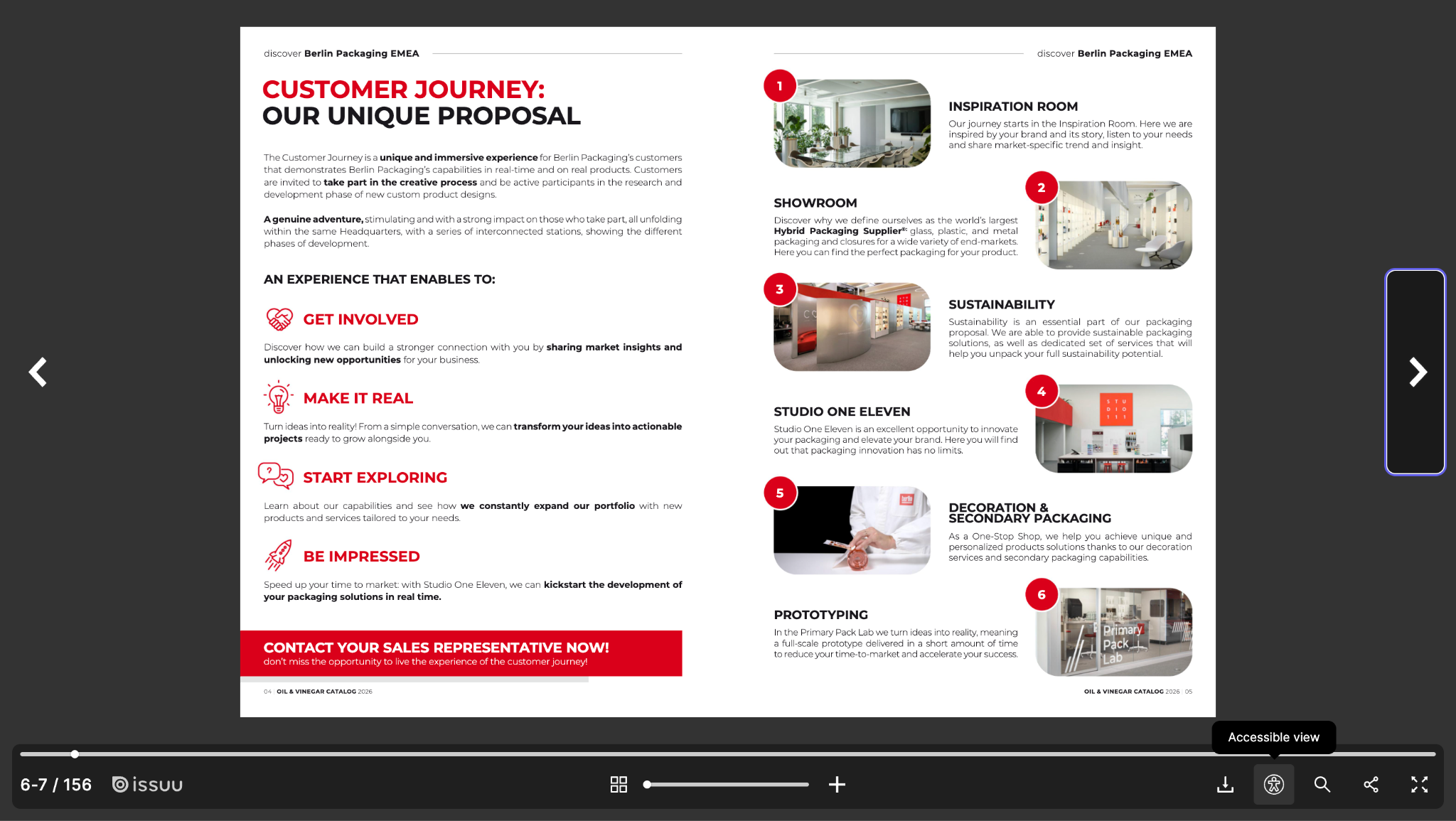
Berlin Packaging's oil and vinegar catalog prioritizes utility over impulse purchasing. A page-flip layout, accessible reading mode, and downloadable PDF serve procurement teams and buyers who need shareable documentation and offline specs. This clearly illustrates the fact that a digital product catalog doesn't have to chase retail-style flash to be effective.
3. Automotive catalog
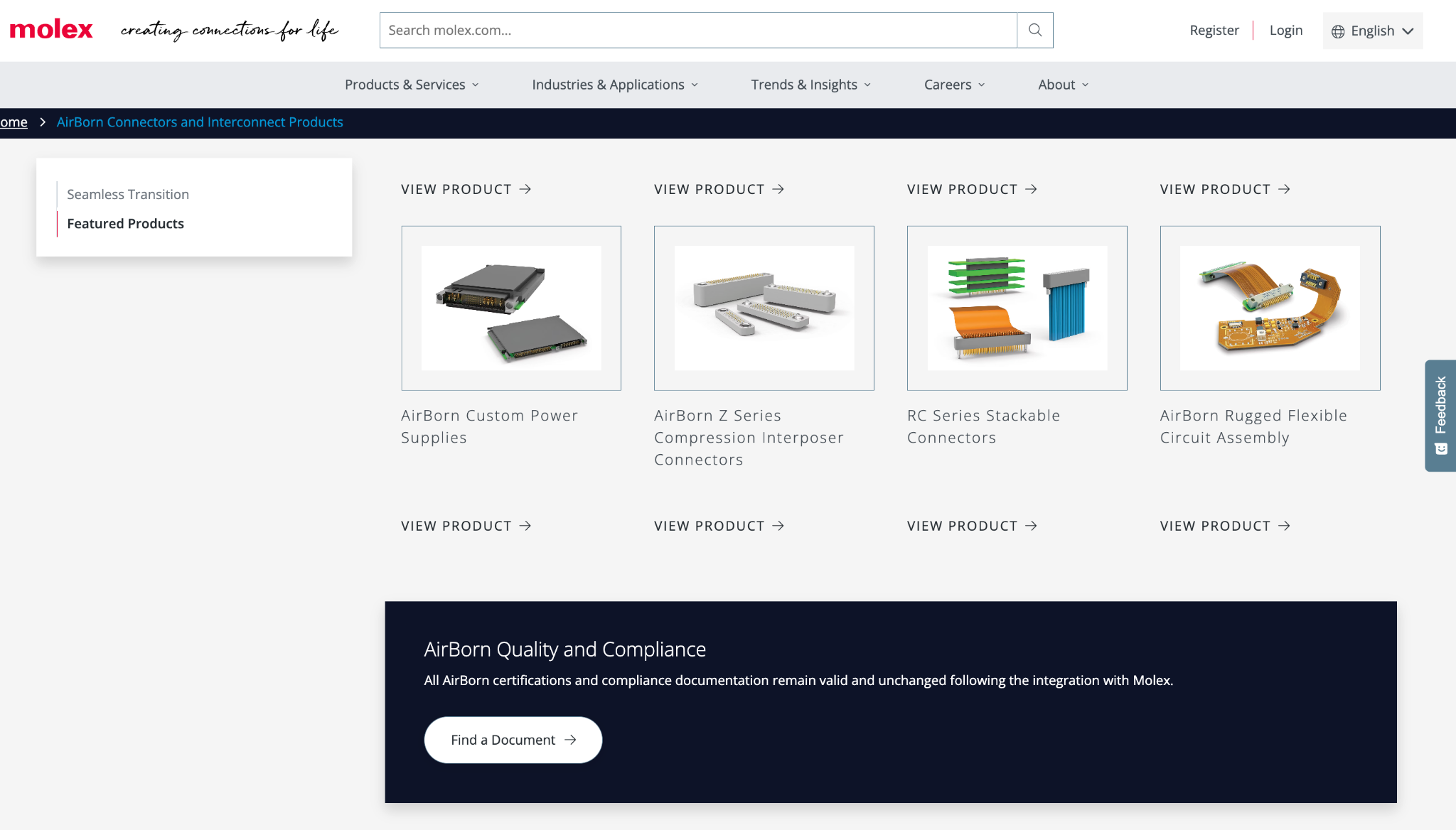
This B2B interactive catalog excels as an engineering discovery hub. Built for high-reliability industries like Aerospace, Defense, and Harsh-Environment Automotive, Molex AirBorn decided to replace static datasheets with dynamic parametric filtering, interactive product series showcases, and digital sample boards. This gives instant access to CAD models, spec sheets, and cross-reference data, plus a built-in quote request, streamlining the sales cycle.
4. Kitchen catalog
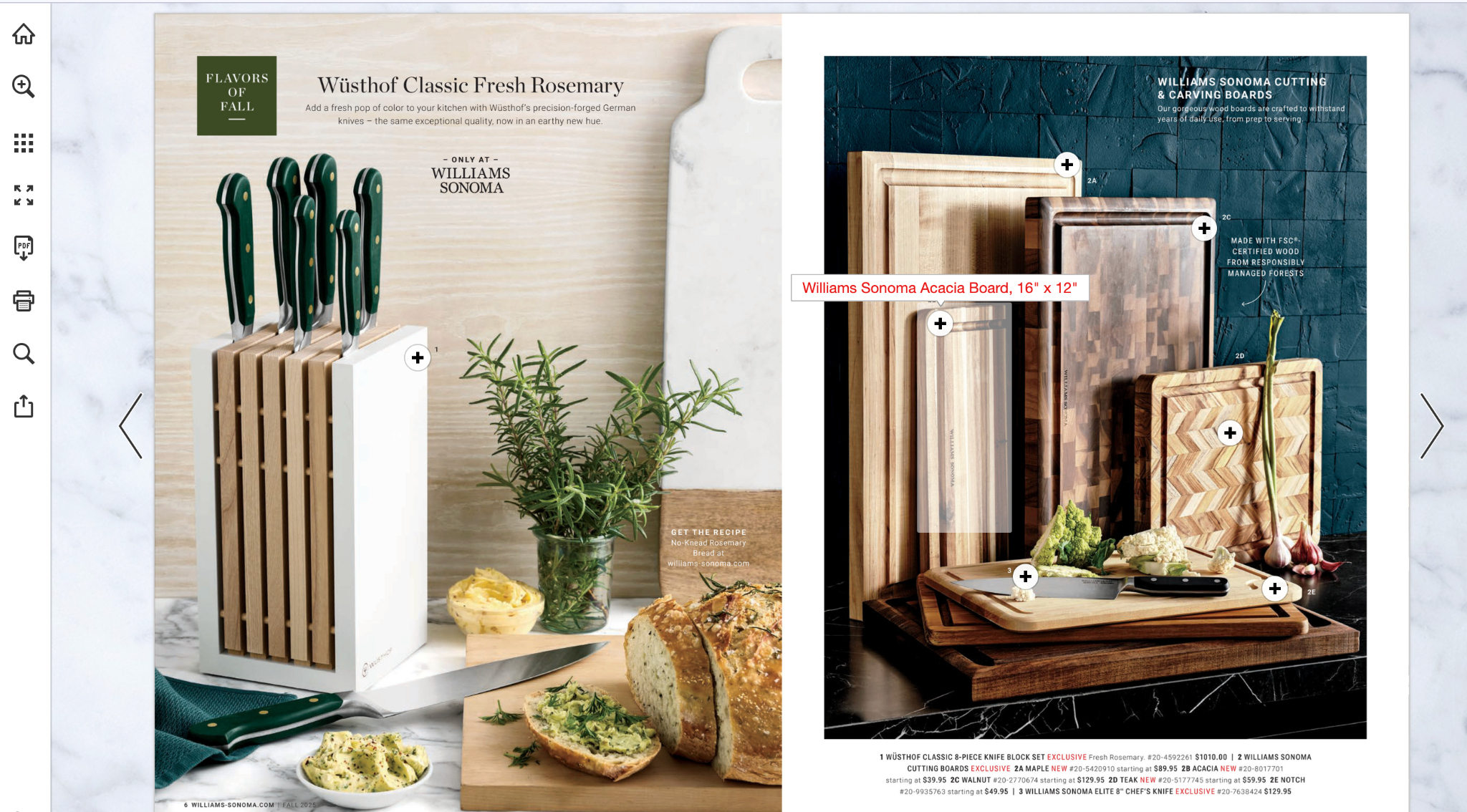
Williams Sonoma’s seasonal catalog is one of the most inspiring examples in this niche. It delivers an exceptional experience by seamlessly blending traditional print aesthetics with dynamic digital functionality. Features like clickable hotspots, instant product previews, rich media, and direct checkout streamline customer engagement. It successfully bridges the gap between passive browsing and active purchasing, significantly boosting conversions.
Benefits of an Interactive Digital Catalog
An interactive digital catalog is not simply a printed catalog converted into a digital format to look more modern. A proper design can transform your sales cycle to improve conversions.
- Easier Product Discovery
Search, filters, categories, and navigation help buyers move through large product ranges without getting lost, supporting genuine product discovery instead of endless scrolling.
- More Engaging Product Experiences
Video, interactive elements, and product visualization give shoppers more ways to explore a product than static images alone. These features can help customers better understand product details, features, configurations, and use cases to make more informed decisions.
- Stronger Connection Between Marketing and Sales
Shoppable links, quote forms, and direct product pages connect discovery with the next step. By making it easier to request a quote or explore product details, interactive catalogs can help create a smoother transition from marketing engagement to sales conversations.
- More Useful for Complex Products
This is where you can utilize assets like 3D visuals, animations, or videos within the catalog. When products have dozens of material, size, or finish combinations, these visuals give buyers a more true-to-life experience and a comprehensive picture of the final product. This builds trust in the buying journey and reduces returns caused by mismatched expectations.
Conclusion
An interactive digital catalog takes the traditional catalog and gives it the tools modern customers expect: clickable links, filters, rich media, and a direct path to purchase or inquiry. For businesses with large or configurable product lines, this is where visual commerce pays off. By combining product information with immersive visual experiences, businesses can make complex products easier to explore and clarify, creating a more seamless buying journey.
Contact us to see how to boost visitor experiences on your catalog with 3D technologies!
Table of Content
-3.avif)
Streamline your process today!